# Forms
So far we've only looked at static website design and reading data. Forms allow users to input data. There are two different ways to do forms in Angular Template-driven and Reactive.
Also here's a cheatsheet on types of databinding in Angular, which i will go into more detail on later:
[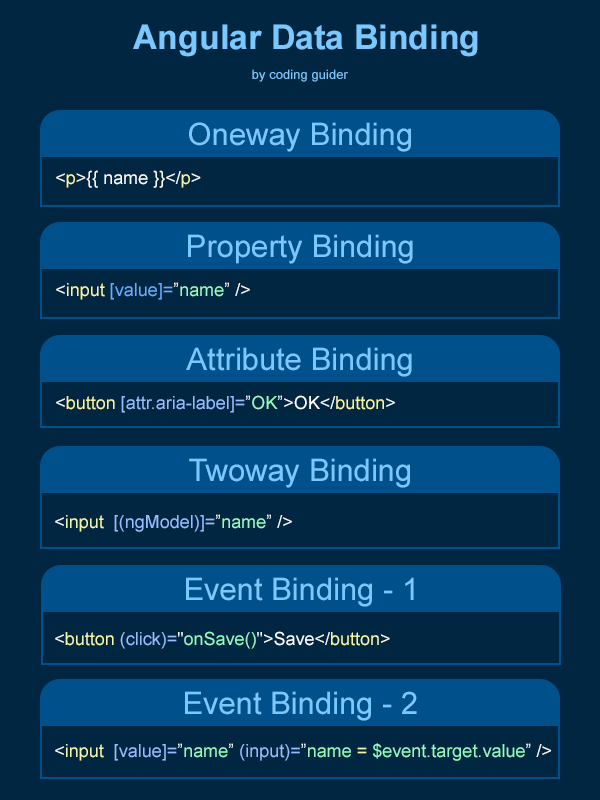](https://bookstack.mitchellhenschel.com/uploads/images/gallery/2022-04/image-1650151620581.png)
# Template-Driven Forms
- Template driven forms are the easier of the 2 to understand. The idea is pretty straightforward:
- We use an HTML element, such as <input> and create variables in the backing typescript file to bind to the elements.
- So as the value in an input changes the typescript variable is automatically updated
- We don't actually submit the form to a server, but instead have a submit button which will be bound to a method in the typescript file that can read the variables to get the form's values
- Import the `FormsModule` in app.module.ts to interact with forms in different template driven ways
## Template Form Validation
- Adding the HTML required tag will enable dynamic class processing on the field for some nice CSS visual cues. Ex:
``
Now when loading the page we see the following classes on that field when it is left blank:

- There are 2 styles of CSS Angular uses on form validation, ng-valid and ng-invalid, to indicate whether the form element passes validation.
- Other control styles:
- ng-touched / ng-untouched - Tells whether user has touched the element
- ng-pristine / ng-dirty - Tells whether the value has been edited
- We can change the behavior of these css styles in the css file
```
// When the input box is invalid
// and has been touched change border to red
input.ng-invalid.ng-touched {
border: 1px solid #f00;
}
```
- We can also add template references so we can check for errors across a form or model
```
```
- To get the data into the forms we use a patch value which allows us to take each of the labels and provide a value for it
```
ngOnInit(): void {
this.roomForm.patchValue({
roomName : this.room.name,
location : this.room.location
});
}
onSubmit(): void {
this.room.name = this.roomForm.controls['roomName'].value;
this.room.location = this.roomForm.value['location'];
// TODO: Call a method in the dataService to save the room
}
```
- We can inject the FormBuilder dependency into the constructor and use it to remove the patch values and form controls we added manually.
```
constructor(private formBuilder: FormBuilder) {
}
ngOnInit(): void {
this.roomForm = this.formBuilder.group({
roomName : this.room.name,
location : this.room.location
});
for (const layout of this.layouts) {
const layoutCapacity = this.room.capacities.find( (lc) => lc.layout === Layout[layout]);
const initialCapacity = layoutCapacity == null ? 0: layoutCapacity.capacity;
this.roomForm.addControl(`layout${layout}`, this.formBuilder.control(initialCapacity));
}
}
```
- And then the HTML can be simplified
```
```
- And validation is very simple in reactive forms. Angular gives us an object type called a validator
```
this.roomForm = this.formBuilder.group({
roomName : [this.room.name , Validators.required],
location : [this.room.location, [Validators.required, Validators.minLength(2)]]
});
```